

Crafting Smarter Interfaces With Anticipatory Design

Giving users explicit choice is generally well-intentioned, but there’s an art to balancing autonomy and clarity. In attempting to represent the full range of options available, designers often think they’re being thoughtful and transparent, when in reality most users neither care for nor want the ‘additional fluff.’
Decision fatigue occurs when users are presented with too much information, or too many options, all at once. It is a real and pervasive consequence of poor UX, and negatively impacts the usability of any product/service/experience.
Some important affects of decision fatigue are:
1. A reduced ability to make trade-offs: Our ability to choose is entirely dependent on our ability to weigh the costs and benefits of each option and choose the one that makes the most sense in context. Decision fatigue affects the ability to accurately prioritize the importance of the trade-offs. This makes the fatigued person less likely to pick the optimal choice when presented with multiple options.
2. Decision avoidance: Decision fatigue can lead people to make poor decisions in an effort to avoid having to make a decision. A common form of decision avoidance is selecting the defaukt option whenever one is availble.
Source: Great Form: The UX of Decision Fatigue and Explicit Choice
Unfortunately, products/services/experiences with an overbearing amount of options are all too prevalent. Perhaps because we’re used to interacting with many of them on a day to day basis, we overlook the fact that they could still be made simpler and more efficient.
As UX designer Miklos Philips writes on TopTal,
“Today, we’re still looking at two-dimensional screens and mostly use keyboards and mice for input; devices designed for interaction methods that were optimized for computers, not humans… It’s as if we’re using interaction models from the Flintstones’ era in a Jetsons’ world; they still rely on a lot of interaction from users (input) to move to the next step and display useful information (output).”
Consider the Adobe Suite for instance, which, according to the Reddit community consensus, performs surprisingly poorly in usability for a set of design tools.

"What the hell do your here?" asks a person new to this program.
What if instead Photoshop was able to suggest the right tool, at the right time, based on workflows, user preferences, context of the project, and so forth?
Designing anticipatory programs is the future of digital interfaces and product design. By pleasantly surprising users and eliminating unnecessary decision-making, anticipatory design can personalize experiences, increase retention, and win the hearts of your audience.
What ‘Anticipatory Design’ Is:
The term was first coined by HUGE CEO Aaron Shapiro in 2015 to describe a system designed to learn and adapt to user needs.
“Imagine a website, which knew you liked reading reviews by industry experts, automatically responding to your inclinations by linking to expert reviews. Meanwhile, someone else, who only cares about price, is shown price comparisons between the site and its competitors. In both cases, the (presumably positive) UX is the product of an anticipated and responsive design.”
- Mitchell Tweedie, Anticipatory Design: The Future of UX Design
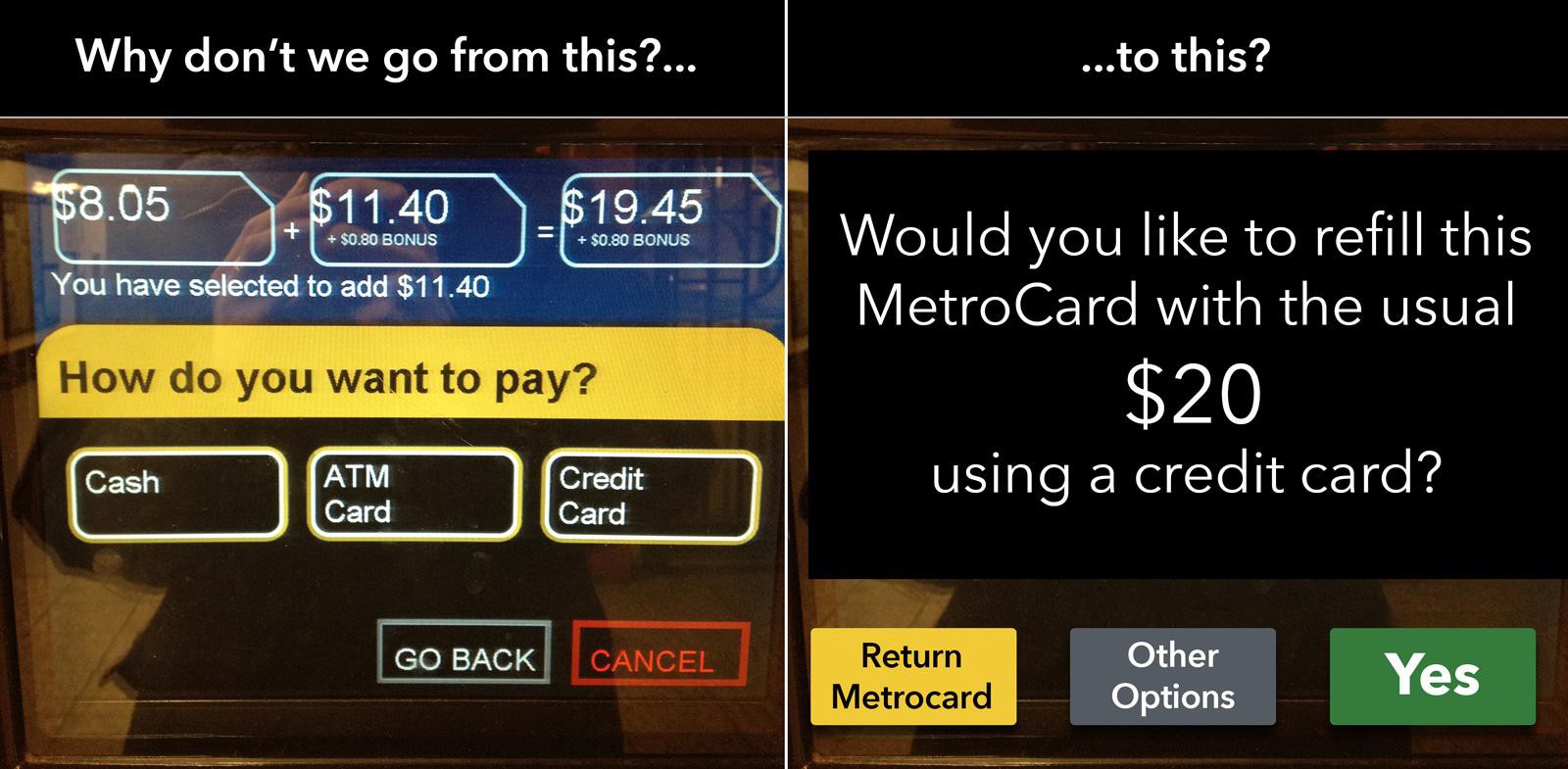
This can manifest in many different ways, but the point is to streamline the process of performing certain functions while sparing users from functions they don’t care for. Here’s a great example using NYC’s MTA (subway) system:
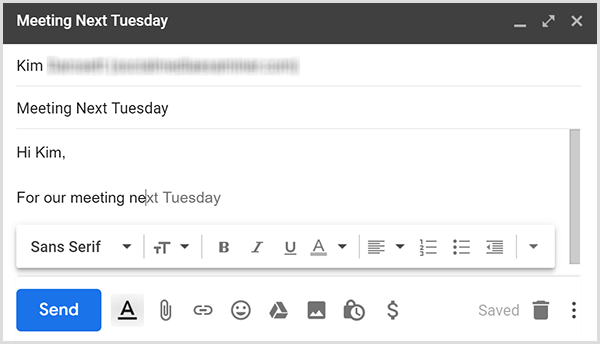
Another example of anticipatory design is predictive text, which is an increasingly common feature among messaging and communications platforms. By relying on contextual clues and texting history, everyday systems like texting and emailing have evolved to streamline workflows and even present us with options we wouldn’t have come up with ourselves.
From the proliferation of automatic breaks in cars to intricately architected web experiences, we’re beginning to see the anticipatory design trend take off. As with any relatively new design trend, there’s still a few misconceptions to correct.
Read on here: